Table of Contents▼
- Available Subjects
- About CSE at MMMUT Gorakhpur
- Key Highlights
- Programs Offered by the Computer Science & Engineering Department
- Minor Degree Programs Offered by CSE (For Other Branches)
- MMMUT B.Tech CSE: Seat Matrix Details
- Computer Science & Engineering Laboratories
- Which Companies Hired CSE Students at MMMUT in 2026?
- Past Recruiters for Computer Science & Engineering at MMMUT
Available Subjects
Computer Science and Engineering subjects at Madan Mohan Malaviya University of Technology, Gorakhpur are organized semester-wise below. Click any subject to open its PYQ PDF directly.
Semester 4
Semester 6
About CSE at MMMUT Gorakhpur
The Department of Computer Science & Engineering (CSE) at MMMUT Gorakhpur was established in 1984. The department offers B.Tech. in Computer Science and Engineering, which is accredited by the NBA under the Washington Accord. It also offers M.Tech. in Computer Science and Engineering and Ph.D. programmes.
The department has laboratories for various areas of Computer Science and Engineering. A departmental library with a collection of more than 500 books in Computer Science is available for students and faculty members. The laboratories and library support the academic and research work carried out in the department.
Key Highlights
- Most in-demand engineering branch
- Strong focus on coding and problem-solving
- High competition and skill-based growth
- Better placement opportunities with effort
- Wide range of career paths in tech
Programs Offered by the Computer Science & Engineering Department
The department offers undergraduate, postgraduate, and doctoral programmes in Computer Science and Engineering. 1. B.Tech. in Computer Science and Engineering 2. M.Tech. in Computer Science and Engineering 3. Ph.D. in Computer Science and Engineering
Minor Degree Programs Offered by CSE (For Other Branches)
Students studying in branches other than CSE (like EE, CE, ME, etc.) have an excellent opportunity to pursue an optional Minor Degree in Computer Science. This program starts from the 4th semester and allows students to gain specialized knowledge in high-demand tech fields alongside their main branch studies. At the time of graduation, students who complete this program receive two degrees: their regular B.Tech degree in their core branch, and an additional Minor Degree in their chosen CSE specialization (for example, B.Tech in EE with a Minor in Data Science). ৹ List of Minor Specializations The department releases a list of minor areas, which can vary from year to year. For reference, the specializations offered to the 2024-2028 batch include: • Data Science • Artificial Intelligence & Machine Learning • Cyber Security & Cyber Physical Systems • Computer Graphics and Virtual Reality • Blockchain and Cryptocurrency • Software Engineering • Spatial Information Technology ৹ How the Credit System Works When you opt for a minor degree in Semester 4, you select a specific "specialization area" from the list above. Once selected, you have to study one extra subject related to that area in every semester from Semester 4 up to Semester 8. Each of these minor subjects carries 4 credits. To successfully earn the minor degree, you must collect a total of 20 extra credits over these five semesters. ৹ The Minimum Batch Size Rule There is a practical condition for these minor programs to run. A specific minor specialization is only conducted if a minimum number of students (usually around 15, though the exact number can vary) opt for it. If a chosen area does not get enough students, the department drops that specific program for the batch. In that situation, the students who originally selected it are required to shift to another minor area that already has sufficient students, or where their addition helps meet the minimum batch requirement.
MMMUT B.Tech CSE: Seat Matrix Details
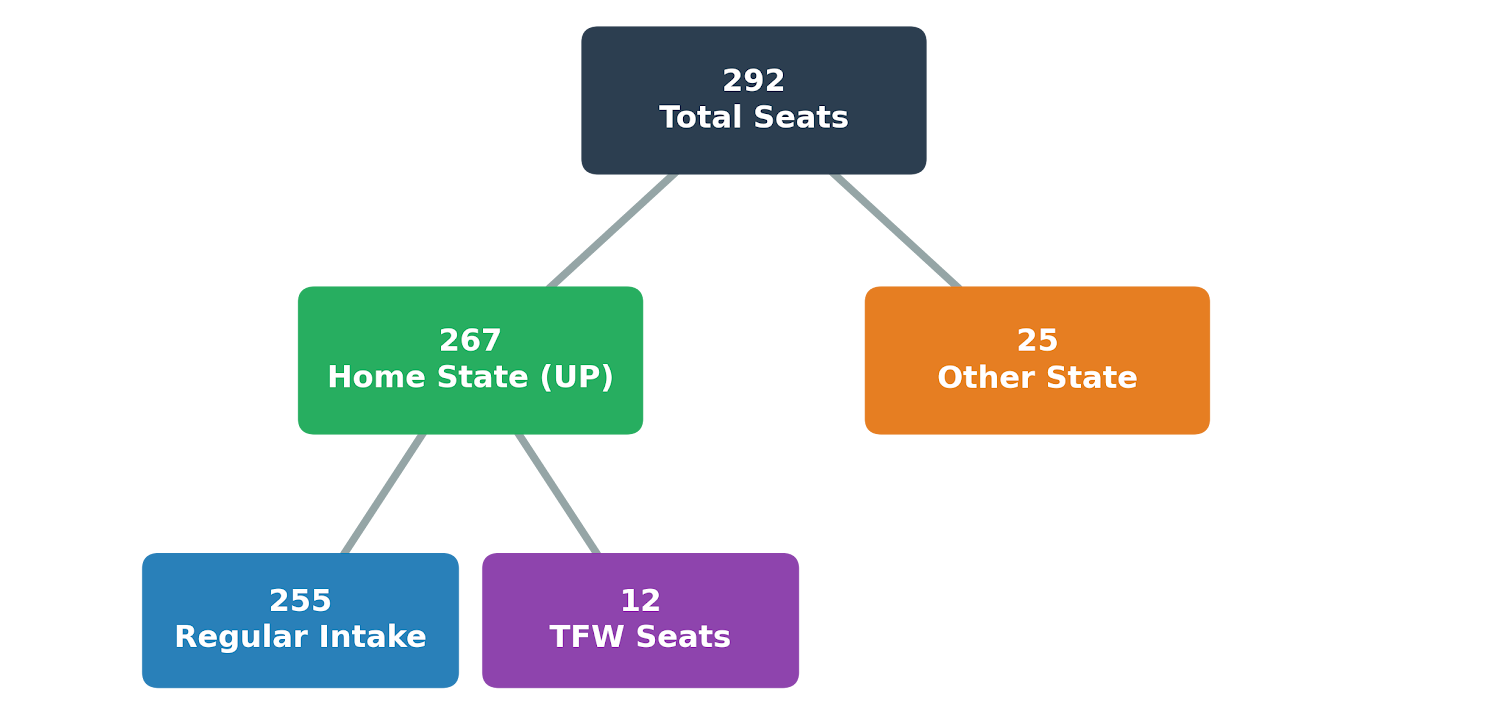
For the CSE branch, there are a total of 292 seats in the first year. This includes 255 regular seats, 12 TFW seats reserved for UP students, and 25 seats for other state candidates. Since it is the most demanded branch, seats get filled up very fast during the regular counseling rounds.
Computer Science & Engineering Laboratories
The department has laboratories covering different areas of Computer Science and Engineering. These facilities are used for laboratory courses, project work, and departmental activities. Major laboratories in the department include: 1. Computer Architecture and OS Lab 2. Multidisciplinary Innovation and Edge Deployment Lab 3. Database and Full Stack Web Development Lab 4. Research Lab 5. Data Structure and Algorithm Lab 6. Computer Network Lab 7. Advanced Cyber Forensics Research Lab 8. Artificial Intelligence Lab 9. Spatial Information Technology and Digital Twin Lab 10. Augmented Reality and Virtual Reality Lab 11. Turing Hall
Which Companies Hired CSE Students at MMMUT in 2026?

- Nandani Tiwari
- Ipshita Gupta

- Prayanshu Gupta
- Pranvi Jaiswal

- Dinkar Gupta
- Aaradhaya Singh
Past Recruiters for Computer Science & Engineering at MMMUT
For Computer Science & Engineering (CSE) students, campus placements are heavily focused on software development, product design, and tech consulting. The university’s placement records show a strong presence of top-tier product giants, fintech firms, and major IT consultants hiring directly from this branch.
| Company Type | Top Recruiters (MMMUT CSE) |
|---|---|
| Tech Giants & Product | |
| IT Services, FinTech & Consulting |
Leading names like Amazon, JPMorganChase, Juspay, and tech-driven platforms like Myntra and Dream11 frequently visit the campus to pick students for core coding and engineering roles. Note: The list of visiting companies change every year based on market conditions. For the most accurate and latest placement details, it is always best to check the official MMMUT website.